

Manual Alerts vs Pine Script Alerts: Key Differences
TradingView allows you to automate alerts in two main ways:
- Manual Alerts(Without Pinescript) – Created using TradingView’s UI (no coding)
- Pine Script Alerts – Triggered by strategy or indicator scripts
Both types can integrate with Xerolite via webhook, but they differ in flexibility, complexity, and how alert messages are constructed.
🧩 Key Differences
| Feature | Manual Alert | Pine Script Alert |
|---|---|---|
| Created via | TradingView UI | Script (e.g., strategy.entry) |
| Needs coding? | ❌ No | ✅ Yes |
| Webhook support | ✅ | ✅ |
| Placeholders | ✅ Some (e.g. {{close}}) | ✅ Full support (e.g. {{strategy.order.price}}) |
| Custom logic | ❌ Limited | ✅ Fully programmable |
| Alert reuse | ❌ Must create multiple alerts | ✅ One strategy, multiple alerts |
| Best for | Simple price-based alerts | Advanced automation |
💬 Alert Message Format Comparison
When integrating with Xerolite, alerts must send a valid JSON message to the webhook URL. Below is how the JSON is written in each method:
📦 Manual Alert Example (Hardcoded)
{
  "action": "BUY",
  "symbol": "AAPL",
  "qty": "10",
  "order_type": "MARKET",
  "currency": "USD",
  "asset_class": "STOCK",
  "exch": "SMART"
}
Manual alerts require you to hardcode every field. If you want to change quantity, symbol, or order type, you need to edit each alert individually.
⚙️ Pine Script Alert Example (Using Placeholders)
{
  "action": "{{strategy.order.action}}",
  "symbol": "AAPL",
  "qty": "{{strategy.order.contracts}}",
  "order_type": "MKT",
  "currency": "{{syminfo.currency}}",
  "asset_class": "STOCK",
  "exch": "SMART"
}
This format allows dynamic values to be filled in at runtime by TradingView, based on your Pine Script strategy. You write the alert once and reuse it across multiple conditions.
💡 Tip: Avoid using {{ticker}} because it may not match Interactive Brokers’ symbol format. Instead, use fixed symbols and define symbol, asset_class, and exch manually, or generate alerts using the Xerolite Smart Alert Builder.
✅ Pros & Cons Summary
🖱️ Manual Alerts
- ✅ Simple setup, no coding needed
- ✅ Good for price alerts or static trades
- ❌ Limited to fixed logic
- ❌ No access to real-time trade values
- ❌ Must create one alert per action (e.g. buy/sell)
💻 Pine Script Alerts
- ✅ Full control via script logic
- ✅ Use placeholders for dynamic values
- ✅ Fewer alerts needed (one script = multiple trades)
- ❌ Requires coding knowledge
- ❌ May take time to debug properly
🛠️ Generate Alerts with Smart Alert Builder
To avoid JSON formatting mistakes and ensure broker compatibility, use the Xerolite Smart Alert Builder in Xerolite. It supports both static and placeholder-based messages.
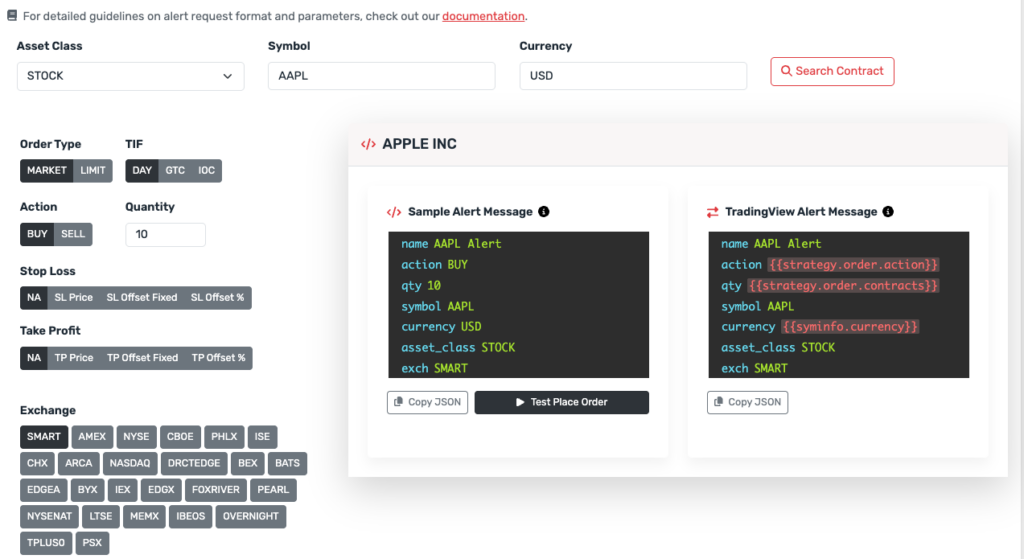
👉 View Alert Request Builder User Manual
👉 View supported fields & placeholders